. Celestina Carmen: May 2010

Friday, May 28, 2010

Potato Printing With Lotta Jansdotter

Simple Printing w/ Lotta Jansdotter from Rowenta USA on Vimeo.


Found this over at Design Sponge.

AddThis Social Bookmark Button

Wednesday, May 26, 2010

Wish List Wednesday


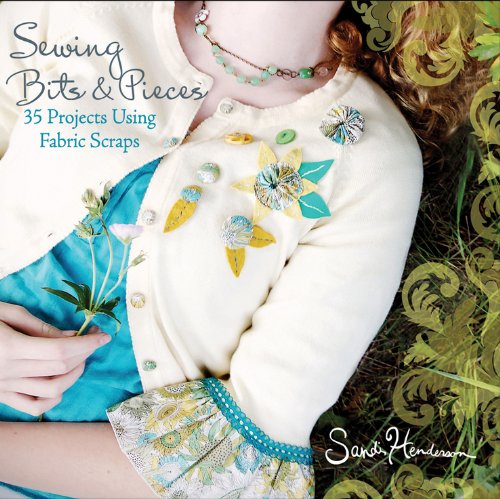
Sewing with scraps is an economical way to make the most of your designer fabrics-as well as a fun way to use up a stash of your favorite leftovers for smaller projects. Michael Miller fabric designer Sandi Henderson holds to the adage "waste not, want not" to deliver a collection of innovative sewing projects that lets you make the most of bits and pieces of your beloved fabrics.

From a market skirt to a butterfly pin, from an embellished table cloth to hip hair accessories, Sewing Bits and Pieces gives you 35 sewing projects to make unique pieces that are perfect for gift-giving (or keeping for yourself)!

  • Features gorgeous full-color photography throughout
  • Detailed instructions walk you through each project
  • Sandi's popular Portabello Pixie blog is read by thousands every day

Packed with tons of fun, innovative projects, Sewing Bits and Pieces will have you creating sewing masterpieces in no time. (Blurb courtesy of Amazon)

AddThis Social Bookmark Button

Friday, May 21, 2010

Lavender Satchels


My bf has been kind enough to grow and maintain lavender for me. I've been cutting and drying for awhile now. I finally have enough dried for about 2 satchels.


I wanted the satchels to be an easy quick sew. I used scrap fabric, whatever thread and needle was left in my sewing machine (from last project), and whatever ribbon was on hand.


Satchel Tutorial ...


Scrap Fabric
Thread
Ribbon (2 pieces, 10" long)


1. I prefer to create a pattern out of freezer paper rather than mark the fabric. Below is a picture of my pattern with markings for future reference. Don't follow the measurements in the picture. I changed them as I went. Here are my final measurement decisions ...

Pattern piece measured 5 1/2" x 3 1/2" and was placed on the fold of the fabric.
The casing is 3/4".


2. After you cut out your fabric piece, open it up and serge/finish the raw edges all the way around.


3. Fold the edges of the short sides 3/4" towards the wrong side of fabric. Topstitch close to the opening. This is your casing.


4. With right sides together, and starting from your topstitching line, stitch down the sides of your satchel. Don't stitch your casing closed! I used a 1/4" seam allowance.

5. Turn right side out.

6. Starting on one side, weave ribbon through both sides of casing. Once you come back around, tie the ends of the ribbon together. Repeat on the other side. Drawstrings are now done.

7. Your satchel is now ready to use.


Lavender Satchel Ideas :
  • Freshen shoe bins.
  • Freshen clothing drawers.
  • Place in pillow cases.
  • Hang in closets or storage areas.

AddThis Social Bookmark Button

Tuesday, May 11, 2010

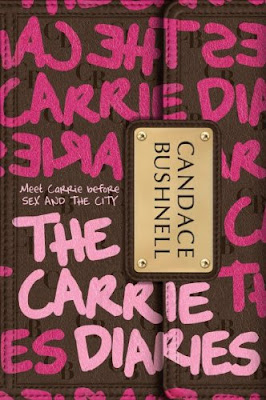
Teaser Tuesdays :: The Carrie Diaries

In my spare time, when I'm not printing, sewing, or crafting ... I'm reading!


TEASER TUESDAYS asks you to:
  • Grab your current read.
  • Let the book fall open to a random page.
  • Share with us two (2) “teaser” sentences from that page, somewhere between lines 7 and 12.
  • You also need to share the title of the book that you’re getting your “teaser” from … that way people can have some great book recommendations if they like the teaser you’ve given!
  • Please avoid spoilers!


Teaser ::
How can you be a feminist when you treat other women like dirt? Then you're just a mean girl like Donna LaDonna. (Pg. 109 of The Carrie Diaries)


Reviews ::


Playing along? Share some teasers, whether it's from a craft book, novel, self-help book, magazine, what ever you're reading. Leave your teasers in the comment section or post a link so I can read your teasers.

AddThis Social Bookmark Button

Monday, May 3, 2010

Keep Track of Your Books With Your iPhone

Are you an avid reader? Do you own many books? Do you loan books out? I've been on the search for an iPhone app to help me organize my books and to keep track of the books I borrow as well as loan out.

I've tested out 3 book apps. Here are my thoughts (All images are from iTunes) ....


MyBooks - This was the first app I used. $1.99


Pros :
  • Really nice interface. Looks like a bookshelf with book covers displayed. 3 different themes - wood, charcoal, metal.
  • You can make 2 lists - one for inventory and one for wish list.
  • Can enter books online (Amazon) or manually.
  • Can sort books by title, genre, rating, purchase date.
  • Lets you track who you loan your books out to (through phone's contact list).
Cons :
  • When entering a book, it takes awhile to search a book through Amazon.
  • Each book must be entered one at a time. This is tedious when you have many to enter.
  • Cannot sync. If this app gets deleted (which my has), all the hard work of entering all your books is lost.
  • There are some glitches that need to be worked out : 1. When you double tap a book, it's a shortcut to lend out. Unfortunately, it doesn't save the book as "out" when you lend with the shortcut. 2. Some crashes. Not as much as before, but I have experienced some crashing here and there. 3. When searching for a book to add, some books don't show up. When I know I've seen them on Amazon.
  • Cannot group collections/series.
  • Last update was almost a year ago. Their are to many glitches for the company to stop updating.
Conclusion = I gave up. I really like the interface but it needs more work. I was willing to stick it out, but with no more updates, I'm done.


iBookshelf - next app I tried. $1.99


Pros :
  • There's a free lite version to try. You can only add 5 books, but that's enough to play around and get a feel for this app.
  • When entering data I look the look. It looks like your entering it on a notepad.
  • You can enter your Read progress. Whether you've read it, or not, or currently in the process.
  • There is a section to make comments on the book.
  • Can view a bigger image of the cover.
  • Landscape view - lets you flip through your book covers.
  • View books by title, author, genre, status.
  • Can keep track of wish list and loaned books as well.
Cons :
  • Interface is bad. It's kind of a turn off. Nothing special, very boring list view.
  • Graphics are pixelated, looking cheap.
  • Out of the 3 apps I've tried, this one took the most effort and longest time importing a book.
Conclusion = I didn't like this the moment I downloaded it. I don't like the look, or set up.


My Bookshelf - Last app I tried. By far the better of the 3. This is the app I'm going to be using to keep track of my books. $2.99


Pros :
  • Nice, sleek graphics and interface.
  • Easy to use.
  • Easy to enter multiple books.
  • Sort by title, author, collections, ratings.
  • I'm digging the collections. Another way to organize your books. You can group what ever you want here. You create the collection.
  • Wish list view. You can organize your wish list by priority.
  • Searches books with Google.
  • Not from the US? You can change the currency or Google search to your location.
  • Keep track of the books you loan out as well as the books you borrow. 2 different views : 1. books listed or 2. friends view and the books they borrowed.
  • Set a warning to let you know when your library books are due.
  • There is a help page! You rarely see this in any apps.
  • Suggest books (through email) from this app.
  • Keep track of what you are currently reading. You can also take notes.
  • Cannot back up data yet, but this is schedule to be released with the next update. This alone is awesome!
Cons :
  • A little pricey for a book app.
  • When searching for a book, you hit title or manual. It takes you to the search screen. Then you have to hit the search bar and type. It should take you directly to the search bar automatically. It's that extra step when entering books that is a little annoying.
  • Cannot view by genre.
  • You can keep track of books you borrow from your friends/library. But, once you return them, the books stay in you library. You don't own the books, they should automatically delete from your library.
  • Books added to wish list cannot be used in collections.
  • Books listed in your wish list have editing limits. It would be nice to be able to have the same editing capabilities as if the book were listed in your library.
Conclusion = This is the one I'm sticking with. As you can see, this app does a lot more than the previous 2. The pros far out way any cons I have.

AddThis Social Bookmark Button
Related Posts with Thumbnails